Importing Fleetio Maintenance Records
Import your Fleetio maintenance history into HaldiTech using the Fleetio or Fleetio Extended import formats.
All of your Fleetio maintenance history can be imported into HaldiTech. HaldiTech can then be the source of your maintenance and service history, including reminding you when PMs are needed, tires need rotating, and so on.
Import your Fleetio file
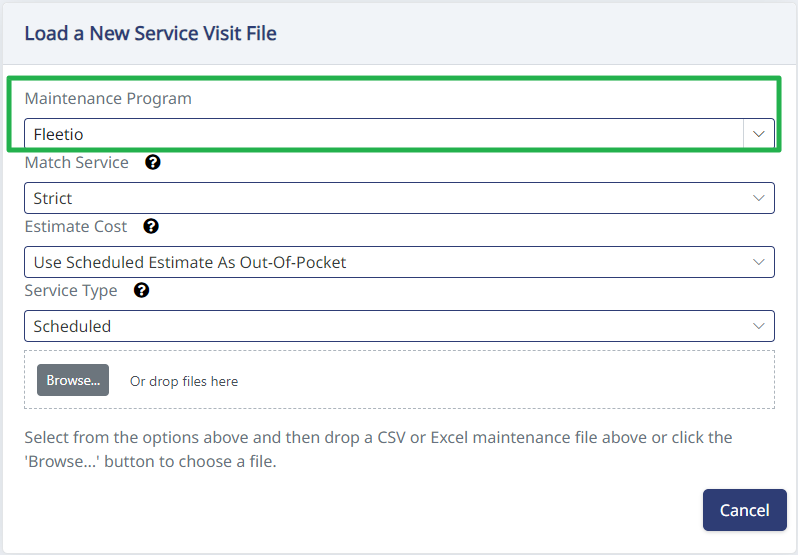
To import your Fleetio file into HaldiTech, go to Maintenance on the left, then Service Items. At the top of the table, click Import Excel.

Then choose either Fleetio or Fleetio Extended from the dropdown, depending on your file. Drag and drop the file and click Save.
Fleetio format — required columns
For Fleetio, the import looks for the following columns in the file:
- Vehicle
- Service Entry
- Completion Date
- Reference
- Vendor
- Notes
- Primary Meter
- Primary Meter Unit
- Service Tasks
- Total Cost
Fleetio Extended format — required columns
For Fleetio Extended, the import looks for the following columns in the file:
- Fleetio ID
- Vehicle Name
- Watchers
- Operator First Name
- Operator Last Name
- Repair Priority Class
- Meter
- Meter Unit
- Secondary Meter
- Secondary Meter Unit
- Service Tasks
- Issues
- Vendor Name
- Labels
- External ID
- Reference
- Created By First Name
- Created By Last Name
- Started At
- Completed At
- Duration (Days)
- Notes
- Labor Subtotal (USD)
- Parts Subtotal (USD)
- Subtotal (USD)
- Tax (USD)
- Discount (USD)
- Total Cost (USD)
- Crated On
- Updated On
- Vehicle Group
- Vehicle Year
- Vehicle Make
- Vehicle Model
- Vehicle Trim
- Vehicle Type
- Vehicle Status
- Vehicle VIN/SN
Need help?
Email support@halditech.com or call us at (470) 594-2534.